Apple Watch companion · Coming in 1.22
Your meals.
Closer to hand.
Tap a usual. Save a meal time. Say what you ate. KeepEatClean’s companion Watch app puts quick logging on your wrist, alongside your iPhone meal history.
Version 1.22 is waiting for App Review. The iPhone app is available now; the Watch update is coming after approval and release.
Free tier · Optional Pro · Available readings depend on your setup
Preview the Watch app coming in 1.22 →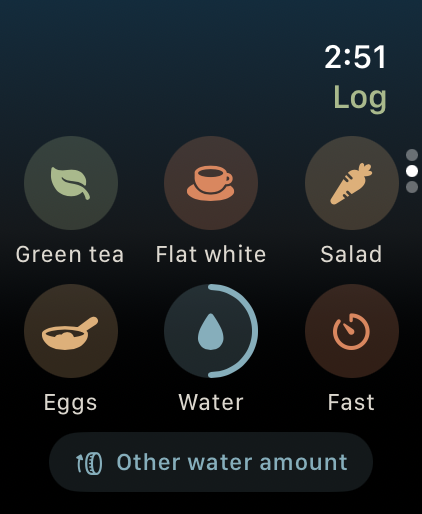
1.22 submitted · Waiting for App Review
A little less phone.
A little more wrist.
The companion app brings quick food logging and meal times to Apple Watch. These are previews of the submitted update. The iPhone app is available now; Watch availability follows Apple approval and release.
Tap your usual.
Log a usual meal or a glass of water from your wrist. Your usuals are set up on iPhone.
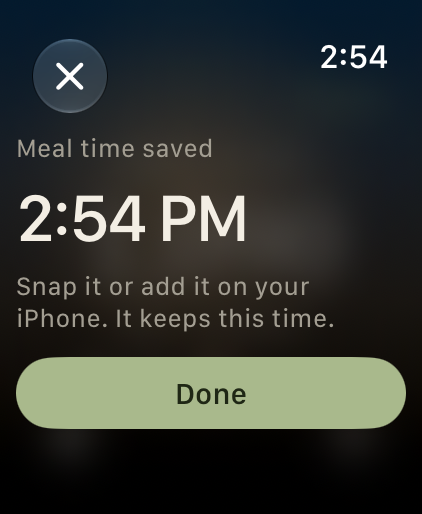
Save the moment.
Tap Eating now to save the meal time. Add what you ate on your iPhone later.
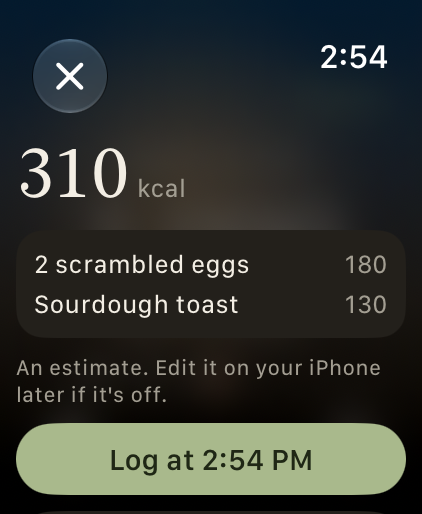
Say what you ate.
Describe a meal, review the estimate and confirm it. Estimation runs on your connected iPhone.
Real app screenshots with sample data. An iPhone is required for setup and meal estimates. Free tier and optional Pro; estimates and available features depend on your setup. No health outcome is promised.
12-second silent preview · Real screens with sample data · Created while 1.22 is in review
Two histories, connected
The Watch records the readings.
You add the food context.
Apple Watch
Sleep, HRV and other available readings
Apple Health
The connection on your iPhone
KeepEatClean
Wearable readings alongside editable meals
Start with a question
A history you can explore.
You do not need to start a new diet. A useful first step is to record your usual meals and check the readings you already collect.
Meal timing
How does my usual dinner time line up with that night’s sleep?
Everyday meals
Which eating habits are worth exploring alongside my own readings?
A consistent record
Do I have meal logs and wearable readings for the same days?
Food × Body checks usable paired days before showing supported associations. It can remain learning or find no clear pattern. Associations do not establish cause and effect or promise better sleep or recovery.
Before your first meal
Three checks.
Then start logging.
Keep your source and meal record clear from the beginning.
Check a recent night in Apple Health
Open Sleep in the Health app and confirm that a recent reading is there. If it is missing, check sleep tracking on your Watch first. Apple’s sleep setup guide ↗
Connect Apple Health in KeepEatClean
Choose Apple Health during setup or under Settings → Health source. Review the permissions and check that recent readings appear. You can review app permissions from your profile in Health. Apple’s Health data guide ↗
Log one usual meal and its time
Review the photo estimate and edit the food or portion when needed. Continue building a record of meals alongside your readings; missing days stay gaps.
Free resource · No email signup
A manageable
21-day routine.
The practical guide and printable checklist help you build a food-and-sleep history one day at a time. Day 21 is a chance to review the routine, with no guaranteed finding.
Good questions
Before you download.
Is there a KeepEatClean Apple Watch app?
Version 1.22 includes a companion Apple Watch app and is currently waiting for App Review. The preview below shows the submitted app with sample data. The existing iPhone app is available now; the Watch update is not yet publicly released.
How does KeepEatClean connect to Apple Watch?
Apple Watch readings reach the iPhone app through Apple Health. Choose Apple Health during setup or in Settings under Health source, review the requested permissions, and check that recent readings appear. Available measures depend on your device, permissions, and recorded data.
What does a meal diary add to Apple Health?
Apple Health holds your wearable readings. KeepEatClean adds an editable meal history and explores how food choices and meal timing line up with that history over time. A meal photo is an estimate: review the food and portion before saving.
How long does it take to see a pattern?
Food × Body needs at least 12 usable paired food-and-health days plus additional evidence checks. Twelve calendar days are not necessarily 12 usable paired days. The app may keep learning or find no clear pattern; there is no guaranteed insight date.
Is KeepEatClean free?
KeepEatClean has a public free tier and optional paid Pro. You can also download the 21-day guide and printable checklist for free, without an email signup. No special Pro grant is included.
Can I use WHOOP instead?
Yes. WHOOP uses a separate connection for its available sleep and recovery readings. It does not supply Apple Health steps. Check the source of each reading in the app.
See the Privacy Policy for data handling and account controls. KeepEatClean is independent and is not endorsed by Apple or WHOOP.
Your history starts with one meal